Designing Data Intensive Applications - Chapter 1
Book Summary

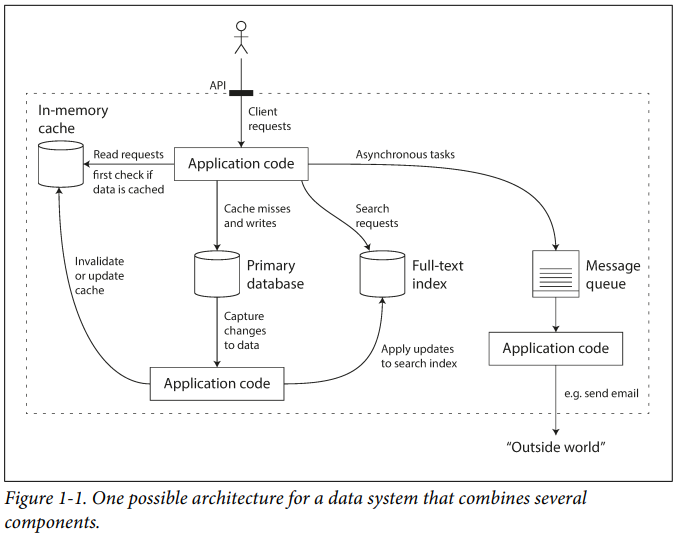
If you are designing a data system or service, a lot of tricky questions arise. How do you ensure that the data remains correct and complete, even when things go wrong internally? How do you provide consistently good performance to clients, even when parts of your system are degraded? How do you scale to handle an increase in load? What does a good API for the service look like?
- There are many factors that may influence the design of a data system, including the skills and experience of the people involved, legacy system dependencies, the time‐ scale for delivery, your organization’s tolerance of different kinds of risk, and regulatory constraints, etc. Those factors depend very much on the situation.
Reliability
Hardware Faults
When we think of causes of system failure, hardware faults quickly come to mind. Hard disks crash, RAM becomes faulty, the power grid has a blackout, and someone unplugs the wrong network cable. Anyone who has worked with large data centres can tell you that these things happen all the time when you have a lot of machines.
There is a move toward systems that can tolerate the loss of entire machines, by using software fault-tolerance techniques in preference or in addition to hardware redundancy. Such systems also have operational advantages: a single-server system requires planned downtime if you need to reboot the machine (to apply operating system security patches, for example), whereas a system that can tolerate machine failure can be patched one node at a time, without the downtime of the entire system.
Software Errors
- Such faults are harder to anticipate, and because they are correlated across nodes, they tend to cause many more system failures than uncorrelated hardware faults.
Examples of Software Errors
- A service that the system depends on that slows down, and becomes unresponsive.
Cascading failures, where a small fault in one component triggers a fault in another component, which in turn triggers further faults.
There is no quick solution to the problem of systematic faults in software. Lots of small things can help: carefully thinking about assumptions and interactions in the system; thorough testing; process isolation; allowing processes to crash and restart; measuring, monitoring, and analyzing system behaviour in production.
Human Errors
The best systems combine several approaches : • Design systems in a way that minimizes opportunities for error. For example, well-designed abstractions, APIs, and admin interfaces make it easy to do “the right thing” and discourage “the wrong thing.”.
• Decouple the places where people make the most mistakes from the places where they can cause failures.
• Test thoroughly at all levels, from unit tests to whole-system integration tests and manual tests.
• Allow quick and easy recovery from human errors, to minimize the impact in the case of a failure. For example, make it fast to roll back configuration changes, and roll out new code gradually.
• Set up detailed and clear monitoring, such as performance metrics and error rates. In other engineering disciplines, this is referred to as telemetry.
• Implement good management practices and training.
Scalability
Describing Load
- First, we need to succinctly describe the current load on the system; only then can we discuss growth questions (what happens if our load doubles?). The load can be described with a few numbers which we call load parameters. The best choice of parameters depends on the architecture of your system: it may be the requests per second to a web server, the ratio of reads to writes in a database, the number of simultaneously active users in a chat room, the hit rate on a cache, or something else. Perhaps the average case is what matters for you, or perhaps your bottleneck is dominated by a small number of extreme cases. (Check the Twitter example in the book)
Describing Performance
Once you have described the load on your system, you can investigate what happens when the load increases. You can look at it in two ways : • When you increase a load parameter and keep the system resources (CPU, memory, network bandwidth, etc.) unchanged, how is the performance of your system affected?
• When you increase a load parameter, how much do you need to increase the resources if you want to keep performance unchanged?
- it’s common to see the average response time of service reported. (Strictly speaking, the term “average” doesn’t refer to any particular formula, but in practice, it is usually understood as the arithmetic mean: given
nvalues, add up all the values, and divide byn.) However, the mean is not a very good metric if you want to know your “typical” response time, because it doesn’t tell you how many users actually experienced that delay. Usually, it is better to use percentiles.
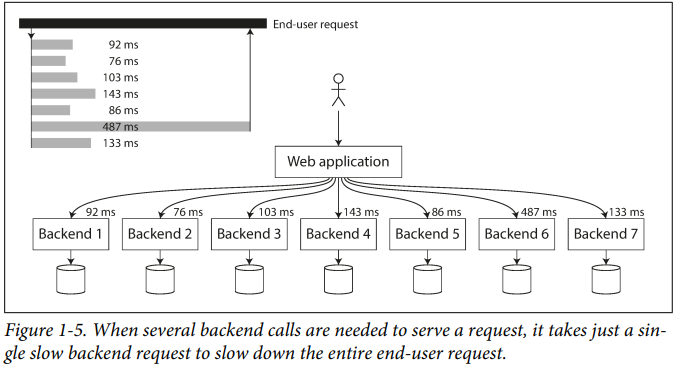
- High percentiles of response times, also known as tail latencies, are important because they directly affect users’ experience of the service.
Approaches for Coping with Load
While distributing stateless services across multiple machines is fairly straightforward, taking stateful data systems from a single node to a distributed setup can introduce a lot of additional complexity. For this reason, common wisdom until recently was to keep your database on a single node (scale up) until scaling cost or high availability requirements forced you to make it distributed.
The architecture of systems that operate at a large scale is usually highly specific to the application—there is no such thing as a generic, one-size-fits-all scalable architecture (informally known as magic scaling sauce).
A system that is designed to handle 100,000 requests per second, each 1 kB in size, looks very different from a system that is designed for 3 requests per minute, each 2 GB in size even though the two systems have the same data throughput.
Maintainability
- We can and should design software in such a way that it will hopefully minimize pain during maintenance, and thus avoid creating legacy software ourselves.
We will pay particular attention to three design principles for software systems:
• Operability.
• Simplicity.
• Evolvability.
Operability: Making Life Easy for Operations
Things a good operations team typically is responsible for :
• Monitoring the health of the system and quickly restoring service if it goes into a bad state.
• Tracking down the cause of problems, such as system failures.
• Keeping software and platforms up to date, including security patches.
• Keeping tabs on how different systems affect each other.
• Anticipating future problems and solving them before they occur.
• Establishing good practices and tools for deployment.
• Performing complex maintenance tasks, such as moving an application from one platform to another.
• Maintaining the security of the system as configuration changes are made.
• Defining processes that make operations predictable.
• Preserving the organization’s knowledge about the system, even as individual people come and go.
Things Data Systems Can Do to Make Routine Tasks Easy :
• Providing visibility into the runtime behaviour and internals of the system, with good monitoring.
• Providing good support for automation and integration with standard tools.
• Avoiding dependency on individual machines.
• Providing good documentation and an easy-to-understand operational model (“If I do X, Y will happen”).
• Providing good default behaviour, but also giving administrators the freedom to override defaults when needed.
• Self-healing where appropriate, but also giving administrators manual control over the system state when needed.
• Exhibiting predictable behaviour, minimizing surprises.
Simplicity: Managing Complexity
- Making a system simpler does not necessarily mean reducing its functionality; it can also mean removing accidental complexity. Moseley and Marks define complexity as accidental if it is not inherent in the problem that the software solves (as seen by the users) but arises only from the implementation.
- One of the best tools we have for removing accidental complexity is an abstraction. A good abstraction can hide a great deal of implementation detail behind a clean, simple-to-understand facade.
Evolvability: Making Change Easy
Agile working patterns provide a framework for adapting to change.
Simple and easy-to-understand systems are usually easier to modify than complex ones. But since this is such an important idea, we will use a different word to refer to agility on a data system level: evolvability.
- There is unfortunately no easy fix for making applications reliable, scalable, or maintainable. However, there are certain patterns and techniques that keep reappearing in different kinds of applications. In the next few chapters, we will take a look at some examples of data systems and analyze how they work toward those goals.
Thank you, and goodbye!


